VSCode Plugin
Certora · Developer Tooling
Simplifying complex CLI commands into a functional GUI.
The Accessibility Gap
The Certora Prover was originally controlled via a terminal command with over 20 different flags. Because it required such specific technical knowledge, the tool was difficult for many developers and researchers to use effectively.
Our goal was to make this powerful technology accessible to everyone, regardless of their CLI proficiency.
Building on Existing Foundations
I inherited the initial version of the plugin from an external agency. My task was to take their architecture, fill the functional gaps, and bring the product to a shippable state.
This required a focus on understanding the original intent while making the necessary adjustments to ensure a cohesive user experience.
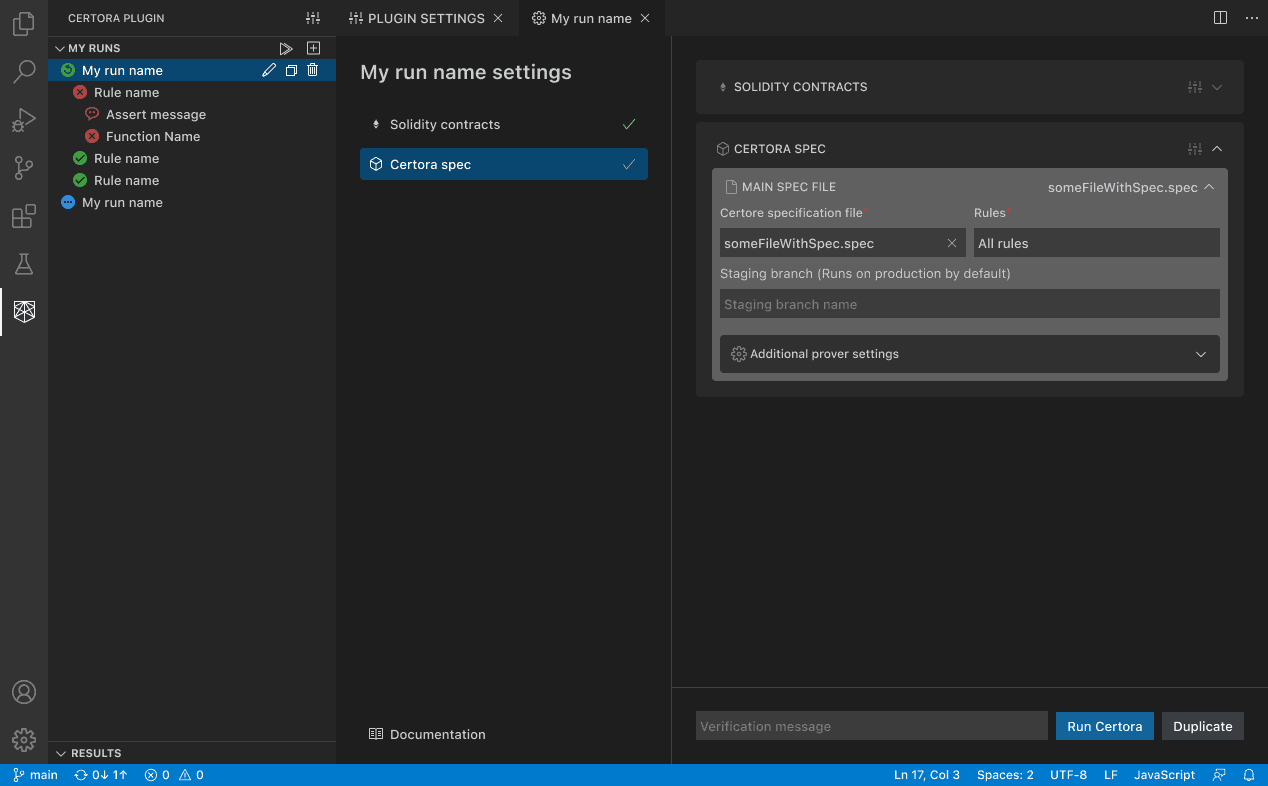
Inline results showing pass and fail statuses directly in the sidebar.
Core Improvements
I designed a sidebar that matches how users actually work: saving and naming different configurations so they can be run independently and organized logically.
By breaking the command into three clear sections (Contracts, Specs, and Messages), I made the tool approachable for new users while remaining familiar to CLI veterans.
This feature allows users to run specific rules rather than the entire set, saving significant time during the debugging process.
Defining the System
The plugin established the visual and technical language for the rest of the Certora ecosystem. The terminology and statuses defined here carried over into the Rule Report and the Dashboard.